Your app works locally and breaks on the server. Check these 7 things

By Oleksii Skurikhin · Delivery Manager
- Published
- Updated
- 12 min read
Run 7 checks after the first deploy of an app built with AI tools that works on your laptop: variables, timeouts, CORS, webhooks, migrations, secrets and DNS, with commands, sample output and a copyable sheet.
Key takeaways
- A server can differ from your laptop in 7 places: environment variables (settings read from outside the code), timeouts, CORS, webhooks, database migrations, secrets, and DNS records.
- The safe first step is a fresh copy of the project, no production keys, no changes on production, and a 60-minute limit; write down what you still do not know.
- The environment-variable check compares the names your code reads with the names set on the host; compare names only, never secret values.
- A key in a NEXT_PUBLIC_ or VITE_ variable ends up in the built code, and a committed key stays in git history; GitHub's first step for a leaked secret is to revoke or rotate it.
- The deploy check sheet has 7 lines, each marked OK, UNKNOWN or BROKEN, and ends with a count of the lines that are not OK.
You built an app with an AI tool, and it runs on your laptop. This page is for the day it has to run on a server. There are 7 places where a server can differ from a laptop, and each one gets a check below, some of them on a copy of your project.
The 7 places are environment variables (settings your app reads from outside its code), time limits, CORS (the browser rule that decides which sites may call your API), webhooks (calls into your app from services such as payments), database migrations (recorded changes to the database layout), secrets, and the domain with its DNS records. A sheet at the end records what you found.
You need the project's code on your computer, a terminal and a login to your host. Some checks also need logins to your payment provider and your DNS provider.
Where do I start without risking production?
Run the first check on a fresh copy of the project, and do not put production keys in it. While you check, change nothing on production: no edits to hosting settings, DNS records, the database or a provider's dashboard. Stop after 60 minutes, and write down what you still do not know on the sheet at the end of this page.
Make the copy with these 2 commands, run in a folder outside your working copy. Replace YOUR-REPO-URL with your repository's address.
git clone YOUR-REPO-URL deploy-check
cd deploy-check
Read each command on this page before you run it, and skip any step that would change something.
What are the 7 gaps between a laptop and a server?
The 7 gaps are environment variables, timeouts, CORS, webhooks, database migrations, secrets, and the domain with its DNS records.
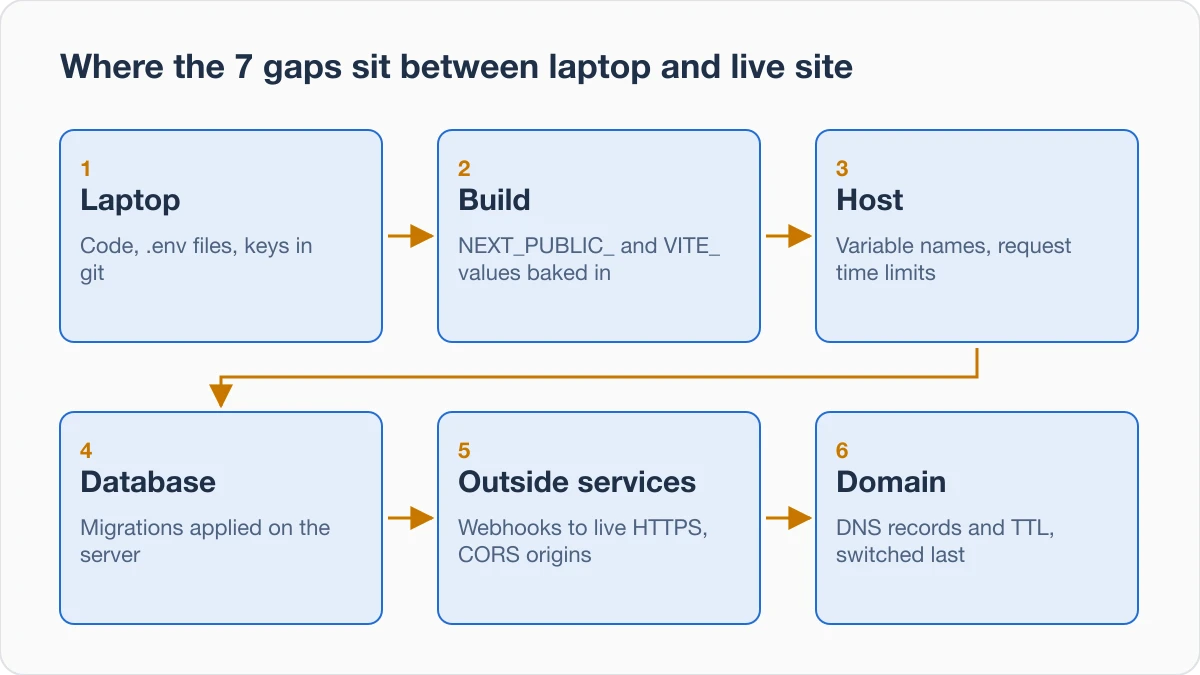
| Gap | Where to look | First check |
|---|---|---|
| Environment variables | Code, host settings | Compare the names in both |
| Timeouts | Host documentation and logs | Compare your slowest action with the host's limit |
| CORS | Browser console, response headers | Read the console error, send a preflight |
| Webhooks | Provider's dashboard | Confirm each endpoint is your live HTTPS address |
| Database migrations | Deploy log, migrations folder | Find the step that applies migrations |
| Secrets | Browser-bound names, git history | Read the names, list commits that touch env files |
| Domain and DNS | DNS provider's records | Run dig, then read the TTL in the provider's table |
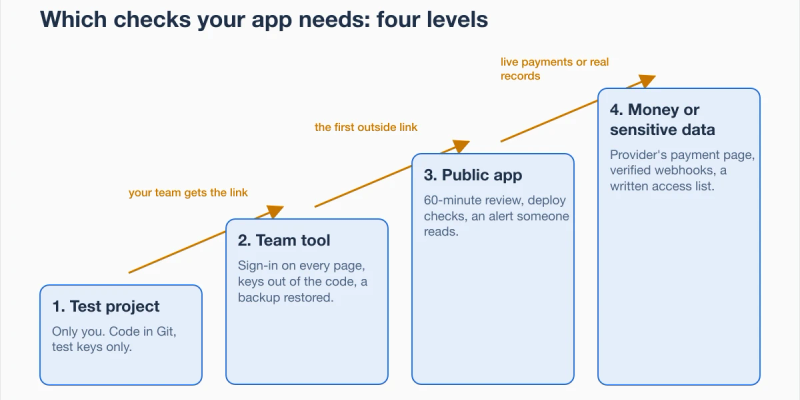
Our post on security checks by level puts these seven checks, run on the live app, at level 3, together with the 60-minute review and an alert that reaches a phone someone reads.
How do I check each of the 7 gaps?
Where a section links a documentation page, its explanation rests on that page. Other providers can differ, so look up the same point for your own host.
The outputs below come from our run on 29 October 2026: the code checks on a demo project made for the check, not a client's, the DNS check on our own domain and the preflight on a public API. Its .env.local file held a localhost address and a test Stripe key, committed once and then removed from tracking.
1. Environment variables: do the host's names match the code's?
An environment variable is a named setting that your app reads from outside its code, such as a web address or a key.
Next.js loads variables from .env* files into process.env, and its default starter template adds all .env files to .gitignore. The same page says you almost never want to commit these files (Next.js docs: Environment Variables). So do not assume the host has them. Check that it has its own setting for each name.
List the variable names the code reads and the names set in the host's settings. Write down every name that is in the first list and not in the second. Compare names only, never secret values. Run this in the copy, and change the folder names to match your project.
grep -rhoE "(process\.env|import\.meta\.env)\.[A-Za-z0-9_]+" app src pages lib 2>/dev/null | sort -uOur demo printed six names, and the host must have a setting for each of them.
process.env.DATABASE_URL
process.env.NEXT_PUBLIC_API_URL
process.env.NEXT_PUBLIC_STRIPE_SECRET_KEY
process.env.OPENAI_API_KEY
process.env.STRIPE_SECRET_KEY
process.env.STRIPE_WEBHOOK_SECRET
The demo has no src or pages folder, and the command skipped both without an error.
Then read the value of each URL variable on the host and check that none still points at localhost. In the demo's .env.local, NEXT_PUBLIC_API_URL was http://localhost:3000, the kind of value this check looks for on the host.
Some values are fixed when the project is built, so a correct setting can still do nothing. Next.js inlines NEXT_PUBLIC_ values into the JavaScript bundle at build time, and the built app no longer responds to changes to them (Next.js docs: Environment Variables).
Vite bundles VITE_ values into the source code at build time (Vite docs: Env Variables and Modes). Rebuild after you change either kind on the host.
2. Timeouts: how long does the host wait for an answer?
Your host may set a time limit for each request. Read that limit in the host's own documentation, and do not assume one.
Write down the slowest thing a user can start, such as an AI call or an export, and your host's documented limit for it. Then look in the host's logs for a time-out entry from its last run.
The trap is comparing the limit with a quick page load. Compare it with the slowest action you wrote down.
3. CORS: does the API allow your live site's origin?
Browsers restrict requests that a page's scripts send to another origin, unless the response includes the right CORS headers (MDN: Cross-Origin Resource Sharing). An origin differs by domain, scheme or port, so a localhost address and your live domain are different origins. Check the root domain and www separately.
First confirm that the API's allowed-origin setting names your live site's origin, not only localhost. Then open the live site in a private window with the console open and repeat the failing action, only if it is read-only, such as loading a page. Do not repeat a form, a payment or an export. MDN says the console is the only place to read the details of a CORS failure.
Send the preflight request, the question a browser asks the API before the real request, by hand. Replace the ALL-CAPS parts with your API address and your site's origin.
curl -i -X OPTIONS https://YOUR-API/PATH -H "Origin: https://YOUR-SITE" -H "Access-Control-Request-Method: POST"Look for an Access-Control-Allow-Origin header whose value equals your site's origin exactly. MDN calls OPTIONS a safe method, meaning that it cannot be used to change the resource.
Our run sent the same request to a public GitHub API address from the made-up origin https://example.com, and it answered with a wildcard.
HTTP/2 204
access-control-allow-origin: *
A public API that allows any origin answers with *. For a request that includes a credential such as a cookie, MDN says the browser blocks access to a response that carries Access-Control-Allow-Origin: *. So for your own API, name your origins exactly, including https and www.
4. Webhooks: does the provider call your live address?
A webhook is a call from another service to your app, such as a payment confirmation. Stripe's documentation says that registered webhook endpoints must be publicly accessible HTTPS URLs (Stripe docs: Webhooks).
In the provider's dashboard, list every registered endpoint and confirm that each uses your live HTTPS address, not a temporary address from testing. Open the delivery log, if the provider keeps one, and count failures. Confirm that the signing secret saved on your host belongs to that endpoint.
Stripe generates a unique secret for each endpoint, and a different secret for test and live use of the same endpoint.
A correct address is not the whole job. Among other points, the same Stripe page describes 3 things to handle on the endpoint.
- Answer fast. The endpoint must return a successful status code (2xx) before any complex logic that might cause a timeout.
- Keep the raw body. Stripe requires the raw body of the request for signature verification, and any manipulation of it causes the verification to fail.
- Expect repeats. An endpoint might occasionally receive the same event more than once, so log the event IDs you have processed and skip events already logged.
5. Database migrations: does the server's database have the latest changes?
A migration is a recorded, repeatable change to the layout of a database, such as a new table or a new column. Each database, on laptop or server, needs the migration applied. Look up in your tool's documentation which command applies migrations to a server's database.
Start in the copy. These 2 commands look for a migrations folder and for a migration step in package.json.
ls migrations prisma/migrations 2>/dev/null
grep -n -i "migrat" package.json
Then answer the questions. Is there a migrations folder in the repository? Does the last deploy log show a step that applies migrations?
For what production has applied, use a status command from your tool's documentation only if its page says it changes nothing. Run it on the host, where the production connection already is, never by putting production keys into the copy. Otherwise write UNKNOWN for this gap on the sheet.
The copy cannot show which migrations production has applied, and a migrations folder in the repository only shows what the project contains.
6. Secrets: is a key in the browser's files or in git?
Look for 2 kinds of leak: a key in a variable that is sent to the browser, and a key that was committed to git. Next.js inlines NEXT_PUBLIC_ values into any JavaScript sent to the browser (Next.js docs: Environment Variables). Vite says VITE_ variables should not contain sensitive information such as API keys (Vite docs: Env Variables and Modes).
Read the name of every browser-bound variable in the code and on the host, and note any name that sounds like a key, secret or token. Then search the git history. Run these in the copy, and change the folder names to match your project.
grep -rhoE "(NEXT_PUBLIC|VITE)_[A-Za-z0-9_]+" app src pages lib 2>/dev/null | sort -u
git log --all --full-history --oneline -- '*.env*'
In our demo the first command printed two names.
NEXT_PUBLIC_API_URL
NEXT_PUBLIC_STRIPE_SECRET_KEY
The second name says SECRET_KEY and is browser-bound, which is exactly what this check is for.
The second command is meant to list commits that touched an env file. Open each commit it lists and check that the file held no real keys. An empty list means this command found none, not that none exist. Our run listed both commits.
798cd5f stop tracking env
353919a first version
The key sits in the earlier one, the commit that added the file. In our scratch repositories, adding .env to .gitignore after a commit did not stop git tracking it, git rm --cached left the file on disk, and the key stayed in the history. The 60-minute read-only review goes further into secrets, data access, logins, backups and spending caps.
Removing the key from git is not the first step. GitHub's guidance says that when the sensitive data is a secret, the first step is to revoke or rotate it (GitHub docs: Removing sensitive data from a repository).
On the Mac we used, the shell's grep was a wrapper around another tool that skipped hidden files such as .env, while /usr/bin/grep, the system grep, listed them. If a search for keys finds no .env file you know is there, run /usr/bin/grep with the full path.
7. Domain and DNS: does the name point where the host expects?
A DNS record maps a name to a server. Its TTL (time to live) is how long the record is cached.
Ask DNS for the root domain and for www, then read the TTL of each record in your DNS provider's record table. Run these 2 commands in a terminal.
dig +short YOUR-DOMAIN
dig +short www.YOUR-DOMAIN
The dig command asks a name server for a name's records and prints the answers. For our own domain it printed this.
$ dig +short cmlteam.com
209.182.238.60
$ dig +short www.cmlteam.com
cmlteam.com.
209.182.238.60
The root answers with an address directly. The www name answers with another name first, cmlteam.com., because it is an alias (a CNAME record) of the root domain. Compare each answer with what your host's domain page asks you to set. If your site uses both names, check both.
A long TTL can slow a switch. When you actually plan one, lower the TTL first and wait for the old TTL to run out (this edits a DNS record, so it is not part of the check). Switch the domain last, once the environment variables, CORS origins and webhook URLs already name the final domain.
What are the limits of these checks?
The statements about Next.js, Vite, MDN, Stripe and GitHub come from the documentation pages listed under Sources, read on 10 October 2026; versions of Next.js, Vite and Stripe's API were not recorded. The plain definitions, checks, advice, table, sheet and time-box are our own, and the outputs are from our 29 October run.
- This page has no data on how often each gap occurs in AI-built apps, so the order of the 7 is a reading order, not a ranking.
- Other providers can differ. Webhooks are shown with Stripe, and environment variables with Next.js and Vite. This page links no documentation for time limits, migrations or DNS records, so read your own host's and tools' pages for those, and re-read any page before you rely on a command or a number.
- The code outputs above come from our demo project, run on 29 October 2026 on macOS with git 2.50.1; the dig and preflight outputs are from the same day. Your project and tools can print different lines.
- The secrets check covers browser-bound names and env files in git history, not files on the server, so an OK there is not proof of no leak.
What can I check today?
Spend 60 minutes on the checks and fill in the deploy check sheet below, one line per gap, each ending in OK, UNKNOWN or BROKEN. The visible result is 7 lines and one number: how many are not OK.
What does the deploy check sheet look like?
Paste one copy of the sheet per project into a text file or a document.
DEPLOY CHECK SHEET (work on a copy, change nothing on production, stop after 60 minutes)
PROJECT:
LIVE URL:
HOST:
CHECKED BY AND DATE:

1 ENV VARIABLES: NAMES IN CODE BUT NOT ON HOST: ____ | URL VARIABLE STILL ON LOCALHOST: YES / NO | STATUS: OK / UNKNOWN / BROKEN
2 TIMEOUTS: SLOWEST USER ACTION: ____ | HOST LIMIT FROM ITS DOCS: ____ | TIME-OUT ENTRIES IN HOST LOGS: YES / NO | STATUS:
3 CORS: ORIGIN ALLOWED FOR THE LIVE SITE: ____ | EXACT MATCH (HTTPS, WWW): YES / NO | STATUS:
4 WEBHOOKS: ENDPOINT IS THE LIVE HTTPS ADDRESS: YES / NO | FAILED DELIVERIES: ____ | SECRET BELONGS TO THIS ENDPOINT: YES / NO | STATUS:
5 MIGRATIONS: MIGRATIONS FOLDER IN REPO: YES / NO | MIGRATION STEP IN DEPLOY LOG: YES / NO | PENDING ON PRODUCTION: ____ | STATUS:
6 SECRETS: BROWSER-BOUND NAMES THAT LOOK LIKE KEYS: ____ | ENV FILES IN GIT HISTORY: YES / NO | ENV FILE STILL TRACKED (git ls-files): YES / NO | STATUS:
7 DOMAIN AND DNS: ROOT ANSWERS: ____ | WWW ANSWERS: ____ | MATCHES HOST INSTRUCTIONS: YES / NO | TTL: ____ | STATUS:

NOT OK COUNT: ____
NOTES: EVERY UNKNOWN AND BROKEN LINE, WITH WHAT YOU SAW
For line 6, git ls-files .env prints .env while git still tracks the file and nothing once it does not.
Next step
Sources
Checked on 10 October 2026.
About the author

Category:Software DevelopmentShip and deploy
Back to Blog