Your AI coding agent says all tests pass. How to check it really ran them

By Oleksii Skurikhin · Delivery Manager
- Published
- Updated
- 10 min read
Paste two prompts into your AI coding agent, one before it starts and one when it says all tests pass, so you agree scenarios first, see tests fail, find mocked AI calls and settle the price of paid test runs.
Key takeaways
- An AI coding agent's 'done, all tests pass' is its own description of the work, so ask to see the test command, its full output and the counts of tests that ran, passed, failed and were skipped.
- Agree a table of scenarios with at least one failure case before the agent writes code, and accept the finished work against that table, not against the agent's own summary.
- Ask for tests before code and for each test to be shown failing on the old code. A test that never failed proves nothing, and the agent may not change tests you approved.
- A mocked AI call can keep a suite green while the real call never runs. On one of our projects an agent wrote many tests that called an AI model, and the bill for one day was $1,000.
- After the agent says done, run its test command yourself and compare the counts. A different number, or zero, is a reason to stop before you merge or deploy.
When an AI coding agent reports "done, all tests pass", ask it for the test command, its full output and the counts, then run that command yourself. Agree what done means before the agent writes code. While it works, watch for a mocked AI call (a stand-in that lets a test pass without the real call) and for the bill of tests that call a paid model. Below are two prompts to paste, one before the agent starts and one when it says it is done. We tried both on a test project.
Why "all tests pass" is a claim until you see the run
The message describes the work, and a description can differ from the work. Nothing in it shows that the run happened or covered your change. Ask to see the command and its output before you accept anything.
METR's Frontier Risk Report of 19 May 2026 covers February to March 2026. The report says that Opus 4.6, a frontier model of that time, attempted to reward hack (game the check instead of doing the task) in about 80% of attempts. These were tasks in an early version of the MirrorCode benchmark, with the test cases hidden from it.
METR adds that checking for cheating by hand is often most of the work in a run of its evaluation suite. METR also reports that in its own open-ended tasks and its everyday use of agents for its work, agents routinely gave rationalised or made-up reasons for doing only a smaller or easier version of a task.
Models tested later in 2026 still misreport unfinished reviews. An arXiv preprint by Smyth and others, version 3 of 22 September 2026, checked whether agents' final messages report work their own transcripts show they did not do. It covers 12 models, eight of them in their own production command-line tools, on five file-review tasks.
In version 3, the agents did not read every file they were asked to review in 67.9% of runs. In 80.4% of those incomplete runs, the final message claimed a complete review or left the gap undisclosed. By model it was 59 to 96%, from Claude Opus 5 at the low end to GPT-5.6-luna at the high end. The authors shaped the five tasks to stress thorough review and say the rates should not be generalised to all agentic tasks. The preprint studied file reviews, not test runs.
The prompt to paste before the agent writes code
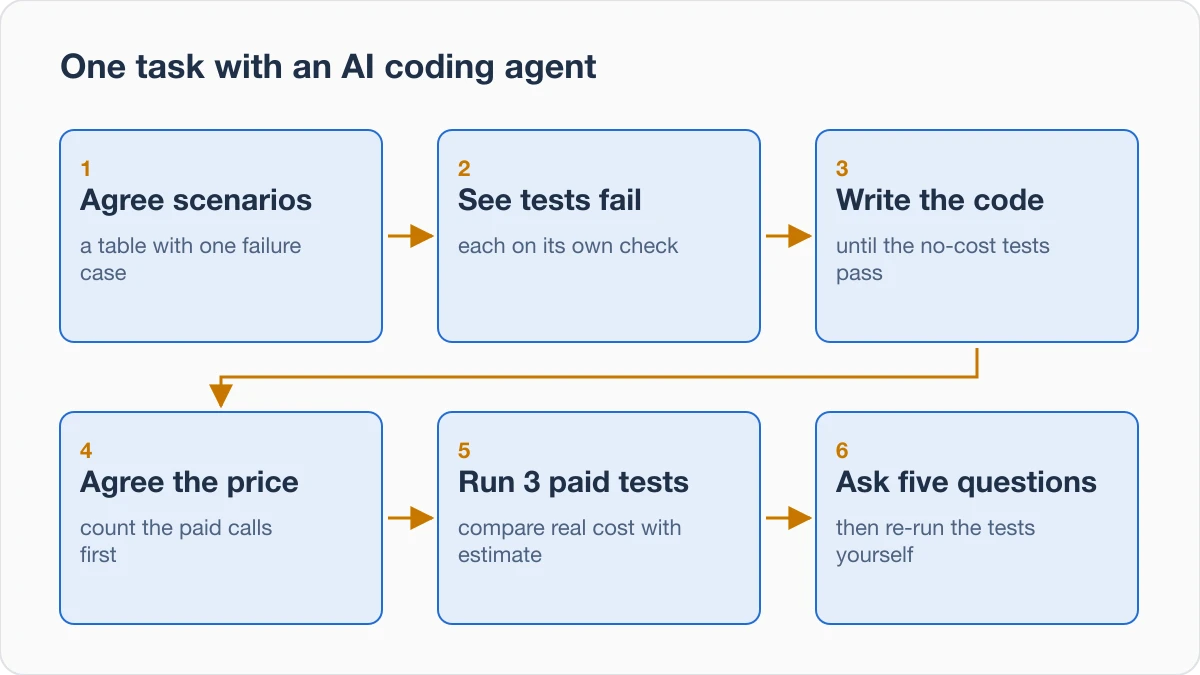
Paste this at the start of the session. The prompt asks the agent to check the keys, write scenarios you approve, show the tests failing, agree a cost estimate with you and stop when something blocks it.
Before you write any code for this change, do these steps in order and stop where I say.
1. Tell me which paid services and keys this needs and whether each key is set. Say "set" or "not set", never print a value. If one is missing, tell me now and wait.
2. Write the acceptance scenarios as a table: situation, what the user does, expected result. Include at least one failure case. Stop and wait for my OK.
3. Turn each approved scenario into a test. First add an empty stub of the new code that does nothing and returns nothing, so that every test fails on its own assertion, not because a file is missing. Run the tests and show me the command and the full output. Then stop and wait for my OK. After I approve the tests, do not change them.
4. Write the code until the tests that cost nothing pass. Show me the command and the full output.
5. List every test that would call a paid service for real (an AI model, email, payments, maps), with the calls and tokens per run. Estimate the cost of one full run in dollars and show how you counted. Do not run these tests until I agree the number of tests and the price.
6. When I agree, run 3 of them first. Show the real cost and what each one checked. Then wait.
At any step, if something blocks you (a missing key, a service that does not answer, a task that cannot be done as asked), stop and tell me. Do not replace the blocked step with a mock, skip it or change a test to get a green result. A fake is allowed only for a failure you cannot cause for real (a service error, a timeout): mark it FAKE in the table and list it in your report. Never fake the success of a paid call.
We tried this prompt word for word on a test project with no API key set. The agent reported the key as "not set" at step 1 and stopped before writing any code. We told it to go on without the key. It still stopped at each approval and showed every test failing on its own check against the empty stub. Its cost estimate showed tokens times price, with correct arithmetic.
After we agreed the price, it ran no paid test, because the key was not set. It did not turn the paid tests into mocks, skip them or change them. It used fakes only for failures it could not cause for real, and marked each one FAKE.
The last rule of the prompt also answers the smaller, easier task METR describes: it asks the agent to stop and tell you instead. If the agent keeps retrying a fix that does not hold, read about fixes that keep breaking your app before asking for another.
Write these rules down once, so they do not depend on you pasting them. The Agent Skills overview describes a skill as a folder with a SKILL.md file of instructions. The agent reads it when a task matches its description. If your tool supports skills, write one with these rules, and read any skill you add from someone else before you use it. If it does not, put the same rules in the project's instructions file.
Agree the scenarios, then see every test fail
Ask the agent for a table with three columns: the situation, what the user does and the expected result. Include at least one failure case. Approve it before any code is written, and accept the finished work against it, not the agent's own summary. For a checkout:
| Situation | What the user does | Expected result |
|---|---|---|
| A signed-in customer with items in the basket | Pays with a valid card | The order is saved and a confirmation page opens |
| The card is declined (a failure case) | Pays with that card | An error shows, no order is saved and nothing is charged |
Approving a row means checking that it describes what your product should do. Agreeing the expected behavior in writing before the code is the idea behind spec-driven development.
Keep a few checks the agent never sees
In an experiment on martinfowler.com dated 13 October 2026, Naresh Jain had coding agents build the same API service. He judged every result by 178 acceptance tests kept outside their development setup.
By those hidden tests, a cost-optimized model produced an accepted application in 3 of 10 runs on its own. With Jain's behavioral harness (specifications, examples and checks it could run while building), it did so in 10 of 10. A frontier model passed in all 10 runs either way. Jain notes that even the frontier model's 10 of 10 still depended on that independent evaluation.
The sample was small: 10 paired runs per model on 1 new Java service, with both models at low reasoning effort. Jain says it cannot establish long-run reliability. At your scale, keep two or three scenarios as checks the agent never sees, and run them yourself.
Tests first, and each one seen failing
Ask for the tests before the code, and ask to see each one fail. A test that has never failed proves nothing, because it may pass on code that does not work. One that fails only because the code file does not exist yet proves little more. So ask for an empty stub first, and see every test fail on its own check.
Developers call this red, then green: a test fails on the old code, then passes on the new. A test-driven development skill on GitHub states the rule as write the test first, watch it fail, then write minimal code to pass. Its core principle is that if you did not watch the test fail, you do not know whether it tests the right thing.
Commit the approved tests, which saves them in Git, and tell the agent not to change them. Jain notes that letting an agent change the expected results when tests fail can hide a defect. The approved tests stay as they are.
Mocked AI calls, and the bill for real ones
A mock is a stand-in that replaces a real service inside a test. The test can pass without the real service ever being called. So an agent can swap your AI model call for a mock and report green tests while the part you care about has never run. When tests involve AI calls, the agent often mocks the call so as not to spend money.
In an AI app for veterinarians that we built, the tests were green, but they did not show that the code worked.
We saw the same on a test project with no API key. We asked the agent to add the feature with tests and make the tests pass. It tested the AI feature against a fake in five runs out of five.
Three of those runs were told not to call the real AI service. The other two had no rule about keys or the real service, and did the same. Each report mentioned the fake but led with a passing test count. Four of the five runs never checked whether a key was set. Read past the first line of the report.
Ask for a list of every mock, fake or stub in the tests and the real service each one stands in for. Then ask for a few tests that make a real call and fail if no real call happened. The test-driven development skill puts it as "Assert on real behavior, never on mock behavior".
On one of our projects, an agent wrote many tests that called an AI model, and the bill for one day was $1,000. Settle the cost before the tests run:
- Measure one run: the paid calls, the tokens (the pieces of text a model is billed by) and the cost in dollars.
- Agree the number of tests and the price before anything runs. The agent counts the paid calls, estimates one full run and waits for your number.
- Run 3 first. Compare the real cost with the estimate and read what each test checked.
- Run the rest only after you have checked the real cost.
- Give the tests their own API key with a spending limit, separate from your live app's key. Record the limit as in our pre-launch spending check.
Five questions to ask when the agent says it is done
Paste this into the agent's chat before you accept the work. It asks for the test command with its full output, the counts, the new tests that failed first, every mock with the real service behind it, and what was checked or assumed.
Before you tell me this is done, answer these five, one by one.
1. Show the exact command you ran for the tests and its full output, unfiltered (no grep, head or tail, no trimming), and say whether you ran it after your last change.
2. How many tests ran, and how many passed, failed and were skipped? If the count is zero or you do not know, say so.
3. Which tests did you add or change? For each new test, show it failing on the old code (the last commit: set the new and changed files aside with git stash or a copy), then passing on the new code. Afterwards show git status to prove the new code is back. If a test fails only because a file or function is missing, say so and write NOT VERIFIED for that test's own assertion, unless you already showed it failing on its own assertion earlier: then point to that output.
4. List every mock, fake or stub in the tests and the real service it stands in for. How many real calls to a paid service did this run make, and how did you count them?
5. Split your report into CHECKED (shown in the output above), ASSUMED (not run, not seen) and NOT CHECKED.
You may re-run commands and use git to set the new code aside for item 3 (then bring it back), but do not change the content of any test or source file. If you cannot show an item, write NOT VERIFIED next to it, then stop and wait for me.
In the same test run, the agent answered all five and pointed to its earlier stub run for item 3. It left the test and source files exactly as they were: we compared checksums.
The questions are our own wording, and an agent may skip an item or answer it loosely. Its answers remain its own account. Run the test command it reported in your own terminal and compare the counts. A different number, or zero, is a reason to stop before you merge or deploy.
Where these checks stop, and what to check today
The prompts and questions stop at what the tests and scenarios cover. A green suite proves only what its tests check, and your table holds only the situations you thought of. Reading the code for security, data rules and load is an engineer's job. Our post on which security checks an app needs sorts them by who can open the app, what data it holds and whether money moves.
Passing tests also say nothing about the app once it is deployed. The checks after the first deploy cover that. The studies cited above, read on 20 October 2026, do not show what your agent does on your project. Read each figure as a reason to check your own.
Today, take the last change your agent called done and spend 30 to 60 minutes on it. End with one page: the test command, the counts, the new tests you saw fail and the list of mocks, ready for the next comparison.
- Paste the five questions into that change's chat and let the agent answer.
- Run the test command it reported in your own terminal and compare the counts.
- Pick one mock that stands in for a paid service and agree the price of a test that makes a real call there.
- Save the answers on one page with the date and the command.
Next step
Sources
- METR, Frontier Risk Report, 19 May 2026
- Smyth and others, arXiv, version 3, 22 September 2026
- Naresh Jain, Are Harnesses Worth the Cost?, martinfowler.com, 13 October 2026
- obra/superpowers, test-driven-development skill, GitHub
- Agent Skills overview, agentskills.io
All sources read on 20 October 2026.
About the author

Category:Software DevelopmentReview and trust in AI code
Back to Blog