What security checks does a vibe-coded app need before launch? Four levels

By Oleksii Skurikhin · Delivery Manager
- Published
- 5 min read
Find your app's level from who opens it, what it stores and whether money moves, then run that level's checks. Each check says what you should see when it is done and the trap that fakes it.
Key takeaways
- The checks an app needs depend on who can open it, what data it holds and whether money moves. Your level is the highest of the three answers.
- Level 2 checks: a sign-in on every page, keys out of the code, and a backup restored into a copy where you find your newest record.
- Level 3 adds the 60-minute review, the seven laptop-to-server checks on the live app, and an alert that reaches a phone someone reads.
- With payments, let customers type card details only on the provider's page, and mark an order paid only after a verified webhook event, never on a thank-you page.
- Do the next level's checks before the event that moves you up: the first outside link, live payments, the first real customer records.
The security checks a vibe-coded app needs depend on three facts: who can open it, what data it holds and whether money moves. Answer those three, find your level, and do that level's checks plus the checks of every level below it.
Which level is your app?
The level of an app is the highest of three answers: who can open it, what it stores and whether it takes payments. Fill in the sheet before you read on. Pick one answer per line; the number in brackets is its level. Your level is the largest number you picked, and you do the checks of that level and of every level with a smaller number.
WHO CAN OPEN IT: ONLY ME (1) | MY TEAM (2) | ANYONE ON THE INTERNET (3)
DATA IT HOLDS: NONE OR MADE-UP DATA (1) | COMPANY DATA (2) | PEOPLE'S EMAILS OR FILES (3) | HEALTH, MONEY OR IDENTITY DATA (4)
MONEY: NONE (1) | TAKES PAYMENTS (4)
MY LEVEL = THE LARGEST NUMBER ABOVE: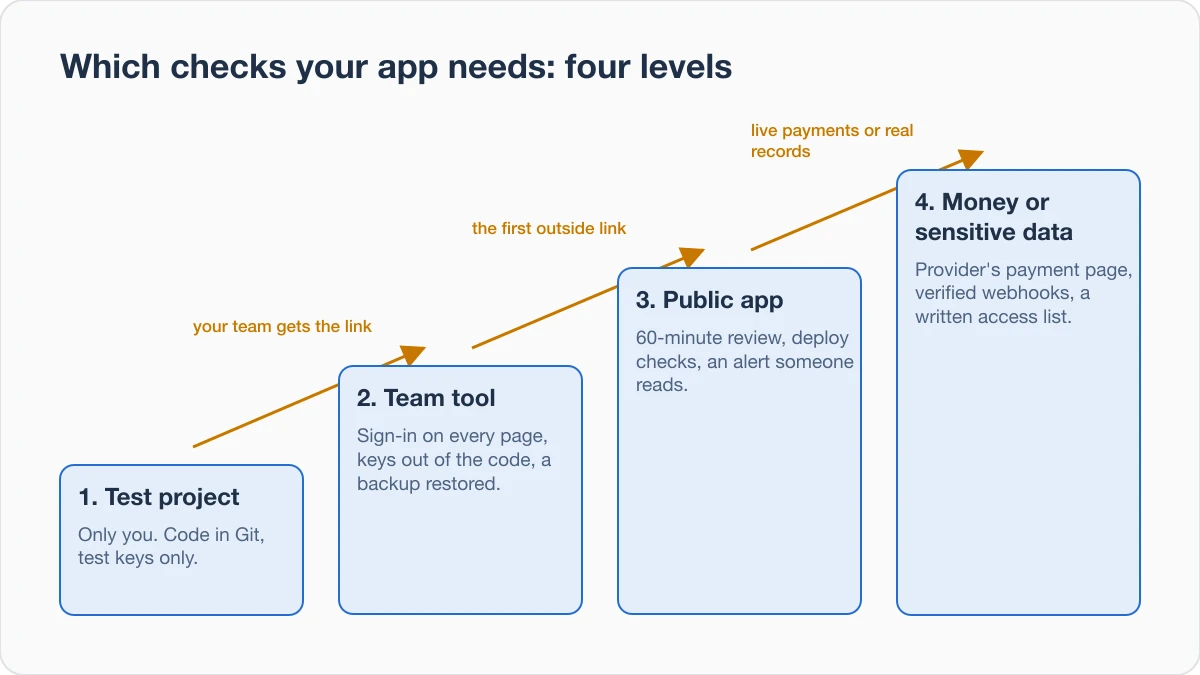
Level 1: a test project only you open
A test project needs one thing: a way back. Keep the code in Git, a tool that saves each change you commit, and push it to a private online repository, so a lost laptop or a bad AI edit does not end the project.
- Done when: the repository's history online shows a commit from today, and you can open yesterday's version of a file.
- Trap: deleting a key from a file does not take it out of the history. Treat any key that was ever saved in a file as exposed, and use test keys only at level 1.
Level 2: a tool your team uses
A team tool holds company data, so three checks apply: a sign-in on every page, keys outside the code, and a backup you have restored.
- Sign-in. Done when: in a private browser window, signed out, you paste the address of an inner page and land on the sign-in page; signed in as one colleague, you change the record number in the address and cannot open another colleague's record. Trap: only the first page asks for a sign-in.
- Keys. Done when: every key lives in the host's settings (the host is the service that runs your app) and a search of the code for the key's first characters finds nothing. Trap: searching only the server code. Search the part of the app that runs in the browser too, and treat a key found there as public.
- Backup. Done when: you restore the latest backup into a new, separate copy, sign in to the copy and find the newest record you remember creating. Trap: a backup nobody has restored is a guess, and a backup kept in the same account as the app is lost with that account.
Level 3: an app strangers sign up for
A public app adds strangers and their data, so do the five checks of our 60-minute review and the seven gaps between laptop and server before launch, then set up an alert.
- Alert. Done when: a monitor opens your app's address on a schedule, and when you point it at a wrong address once, a message reaches a phone that someone reads. Trap: the alert goes to an inbox nobody opens.
Level 4: money or data that could hurt people
Level 4 splits in two. With payments, the risk is lost money; with health, money or identity data, the risk is harm to people.
- Payment page. Stripe's guide to security and PCI compliance says a business that handles card data directly may have to meet more than 300 security controls, and that its low-risk integrations send payment details directly to Stripe without passing through your servers. Done when: a test payment completes and the card number is typed only on the provider's page. Trap: your own card form that looks like the provider's.
- Payment events. A webhook is a message the payment provider sends to your app when something happens. Stripe's webhook documentation says to verify that events come from Stripe before acting on them, because an attacker could otherwise send fake events that trigger actions such as granting account access. Done when: an order turns "paid" only after the verified event, never because the customer reached a "thank you" page. Trap: the "thank you" page sets the paid status.
- Sensitive data. Done when: you hold a written list of each kind of user, each table or file store, and whether that user may read or write it, with the result of trying each one signed out and as another user. Trap: the check covers the screens, not the data requests behind them. Smart contracts have their own checks before mainnet.
Move up before the event, not after
The move to the next level is an event you control, so do the next level's checks before it: the day you send the link to someone outside the team, the day you switch payments from test mode to live mode, the day you load the first real customer's records.
Picture a founder whose team booking tool sits at level 2. The day before the first outside customer gets the link, the founder searches the code for keys, restores the latest backup into a copy, runs the 60-minute review and the deploy checks, and points the alert at a wrong address once.
If AI fixes keep breaking the app while you work through a level, its five questions help you decide whether to keep prompting or hand the work over.
Where these checks stop
The level checks above are our advice, not a standard, and they do not make an app safe on their own. Privacy law, card-payment rules and a professional security review sit outside them. Bring in an engineer before the day an app reaches level 4, and whenever a check above shows something you cannot explain.
Check today
Fill in the sheet, do one check of your level, and write down what you saw on the screen. A written result is the proof that the check was done; an empty line tells you what to do next.
Next step
Sources
- Stripe documentation, security and PCI compliance guide, read 28 October 2026.
- Stripe documentation, webhooks, read 28 October 2026.
About the author

Category:Software DevelopmentShip and deploy
Back to Blog